Epson TM-L90 Desktop Label Printer: Specs and Buying Guide
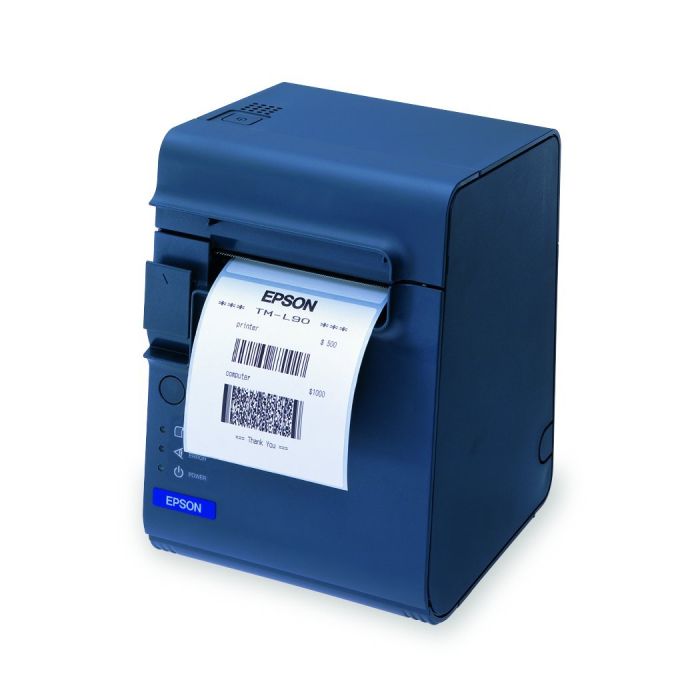
The Epson TM-L90 occupies a category most buyers do not know exists: a printer that produces labels, tickets and receipts from the same unit, driven by ESC/POS like a POS printer rather than ZPL like an industrial label printer. That distinction is the whole point. If your POS system already speaks ESC/POS and you need labels as well as receipts, the TM-L90 slots in without a second integration. This guide covers the full TM-L90 specification, where a POS-language label printer beats a conventional one, and what to check before buying.
Why a Label Printer That Speaks ESC/POS
Industrial and desktop label printers overwhelmingly use ZPL or EPL - Zebra's languages, which became the standard for warehouse and logistics labelling. That is fine when a WMS is generating the labels. It is a problem when your label needs to come out of a retail POS, a pharmacy dispensing system or a ticketing application that only knows how to talk to receipt printers.
The TM-L90 solves this by using ESC/POS, the receipt printing standard. A POS system that already drives an Epson TM-T88VII at the till can drive a TM-L90 for labels with essentially no new integration work. For businesses without development resources, that difference decides the project.
It also handles three media types from one device - labels, tickets and receipts - so a pharmacy can print a prescription label and a receipt, or a venue can print a ticket and a confirmation, without two machines on the counter.
Epson TM-L90 Full Specifications
| Part Number | TM-L90 |
| Manufacturer | Epson |
| Print Method | Direct Thermal |
| Print Resolution | 203 dpi (8 dots/mm) |
| Print Speed | Up to 90 mm/sec (3.5 in/sec) |
| Max Print Width | 3.15 inches (80 mm) |
| Max Media Width | 4.25 inches (108 mm) |
| Media Types | Labels, Tickets, Receipts |
| Memory | 2MB NV |
| Auto Cutter | Optional |
| Connectivity | USB, Serial, Ethernet (model-dependent) |
| Programming | ESC/POS |
| Weight | 3.7 lbs |
| Condition | New |
| Warranty | 30-day TechSellerUSA warranty |
Direct Thermal: Understand the Limitation
The TM-L90 prints by direct thermal, meaning no ribbon. That keeps running costs and maintenance low, and there is no consumable to thread or run out of mid-shift.
The consequence is print life. Direct thermal output fades with heat and light over months, which is completely acceptable for prescription labels consumed within weeks, event tickets used the same day, shelf labels replaced at the next price change, and food labels with a short shelf life. It is not acceptable for asset tags, long-term inventory identification or anything that must remain legible for years.
If you need durable labels, a thermal transfer printer using a ribbon - such as the Zebra ZD421 - is the correct device class, and it will speak ZPL rather than ESC/POS. That is the real trade-off with the TM-L90: easy POS integration in exchange for shorter label life.

SKU: TM-L90 | New | 30-day warranty | Single or volume orders
View Details & Request a Quote →Where the TM-L90 Fits
Pharmacy prescription and dispensing labels, event ticketing and box office, hospital and laboratory specimen labelling, food service date and allergen labelling, retail shelf-edge and promotional labels, and parking or transport tickets.
What these have in common is not the label itself but the system generating it. In every case the label is produced by an application that also prints receipts or documents, and forcing a ZPL printer into that workflow means writing and maintaining a second integration.
At 203 dpi it prints small text, standard 1D barcodes and QR codes cleanly, which covers prescription labels, ticket barcodes and shelf labels comfortably. For very small dense 2D codes on tiny items, a 300 dpi industrial printer is a better fit.
Its 90 mm/sec print speed is modest by industrial standards, and that is appropriate - this is a counter printer producing labels one or a few at a time, not a machine feeding a pack line. For high-volume continuous labelling, an industrial unit such as the Zebra ZT411 is the right specification.
Media Width and the Print Width Gap
Note the difference between 3.15 inches of print width and 4.25 inches of media width. The printer accepts stock wider than it prints on, which allows for liner margins on label media and for label stock with backing wider than the printable face.
This trips people up when specifying media. The number that matters for your label design is the 3.15 inch print width - a 4-inch label face will not print edge to edge. Check your label artwork against the printable width rather than the media width before ordering stock in quantity.
Buying the TM-L90 from TechSellerUSA
We supply the TM-L90 new with a 30-day warranty, as single units or in volume for multi-site rollouts. Because connectivity and the auto cutter option vary by configuration, confirm both at the point of quote along with your media specification. Browse the full Epson printer range or our complete printers and scanners category.
Frequently Asked Questions
Why does the TM-L90 use ESC/POS instead of ZPL?
Because it is designed to be driven by POS and dispensing systems rather than a warehouse WMS. If your application already prints receipts over ESC/POS, it can print labels on a TM-L90 with essentially no new integration - which is the main reason to choose it over a conventional ZPL label printer.
How long do TM-L90 labels last?
It prints by direct thermal, so output fades with heat and light over months. That is fine for prescription labels, event tickets, shelf labels and short-shelf-life food labels. For asset tags or long-term identification, a thermal transfer printer using a ribbon is required.
Can it print receipts as well as labels?
Yes. It handles labels, tickets and receipts from the same unit, which is why it suits pharmacies printing a prescription label plus a receipt, or venues printing a ticket plus a confirmation, without two machines on the counter.
What is the difference between print width and media width?
The TM-L90 accepts media up to 4.25 inches wide but prints up to 3.15 inches. The printable width is the number that matters for your label design - a 4-inch label face will not print edge to edge. Check artwork against print width before ordering stock in quantity.
Is 90 mm/sec fast enough?
For counter work producing labels one or a few at a time, comfortably. It is modest by industrial standards because that is not what it is for - high-volume continuous labelling on a pack line needs an industrial printer such as the Zebra ZT411.
Need a label printer that works with your existing POS system? Request a quote on the Epson TM-L90 and our team responds within one hour during business hours.
