Printer Connectivity: USB, Ethernet, Wireless and Serial

The interface on a label or receipt printer is chosen once and lived with for the life of the device, and it is the specification most often decided by whatever was cheapest or whatever the last printer had.
It is also the specification that determines whether the printer can be shared, whether it survives a PC replacement, and whether a fault takes ten minutes or a site visit to resolve. This guide covers what each option actually does, where each one fails, and how to choose without ending up with a printer that works but cannot be managed.
USB
Simplest to deploy and the most limiting over time.
A USB printer is bound to one host. Whatever is plugged into it owns it, and nothing else can print to it unless that host shares it over the network, which makes the host a dependency for every other user.
Where it works well is a single-station deployment: one PC, one printer, sitting together. Retail counters, dispatch desks, single-bench labelling. No addressing, no network configuration, no firmware to keep current.
Where it causes trouble is everything that comes later. Replacing the PC means reconfiguring the printer. Moving the printer means moving the cable. Adding a second user means either a second printer or sharing through a host that then cannot be rebooted during working hours.
Two practical notes. Cable length is limited to around five metres before you need an active extender, which rules out mounting the printer any distance from the host. And USB printers usually enumerate by port, so plugging into a different socket on the same PC can present as a new device.
Ethernet
The default for anything that more than one person or system will print to.
An Ethernet printer holds its own address and accepts jobs from anything that can reach it. Multiple workstations, a warehouse management system, an ERP, a print server, all without a host in between. This is what our print server versus direct IP guide covers in more detail.
It also gives you a management path. Most enterprise printers expose a web interface over the network for status, configuration, firmware and counters. A printer you can query remotely is a printer you can diagnose without walking to it, which matters more as sites multiply.
The requirement people underestimate is addressing discipline. A printer on DHCP can change address after a power cut, at which point every system with the old address in its configuration stops printing. Static addressing, or a DHCP reservation against the MAC, is not optional on a printer that systems print to by address.
The physical requirement is a network drop where the printer sits. In a warehouse or on a production line that is frequently the constraint that decides the interface, not the printer itself.
Wireless
Solves the cabling problem and introduces a different set.
Wireless suits printers that move, sit where no drop exists, or are deployed temporarily. Mobile carts, seasonal stations, buildings where running cable is impractical.
The failure mode to understand is that a print job is bursty and intolerant of interruption in a way that general network traffic is not. A dropped association mid-job produces a partial label, a jam, or a job that silently disappears. Coverage that is adequate for a handheld scanner is not automatically adequate for a printer that must complete a job cleanly, which is the subject of our warehouse WiFi guide.
Check three things before specifying wireless. The band and standard the printer supports, since some industrial models remain 2.4GHz only and will sit in the most congested part of the spectrum. The authentication methods it supports, because enterprise WPA with certificates is not universal on printer hardware. And whether it holds a static address, for the same reason as Ethernet.
Bluetooth
Narrow in application and well suited to it.
Bluetooth is the interface for mobile printers paired to a handheld or a phone. Route delivery, field service, shelf-edge labelling, mobile receipting. One device, one printer, walking together.
It is not an alternative to Ethernet for a fixed printer. Range is limited, pairing is one-to-one in practice, and there is no management path. Where a mobile printer needs to serve several devices across a shift, pairing management becomes the operational burden rather than the printing itself.
Worth checking whether a given mobile printer offers Bluetooth and WiFi together. Many do, and the combination allows pairing to a handheld while remaining manageable over the network when docked.
Serial
Still present on industrial and POS hardware, and occasionally still the right answer.
Serial persists because it is deterministic and because a great deal of installed equipment speaks it. Scales, weighing systems, older POS terminals, PLCs and production line controllers frequently have a serial output and no other.
If you are replacing a printer in an installation like that, the new printer needs a serial port or you need a converter, and converters introduce a component that can fail and a driver that can stop matching the operating system. Where the host equipment is not changing, matching the existing interface is usually less risky than adding a translation layer.
Choosing
The question that settles it is not how the printer will be connected, it is how many things will print to it and who will have to fix it.
One host, one printer, sitting together — USB is adequate and simplest.
More than one host, or a business system printing to it — Ethernet, with a static address or DHCP reservation.
The printer moves with a person — Bluetooth, ideally with WiFi as well.
The printer is fixed but there is no drop — wireless, after checking coverage at the printer's actual position rather than nearby.
Replacing a printer attached to industrial or legacy equipment — match the existing interface.
One further consideration for multi-site estates. A printer with a network interface can be inventoried, monitored and firmware-managed remotely. A USB printer cannot, and that difference compounds across sites in a way that is invisible at purchase and obvious two years later.
Interfaces are frequently a model variant, not an add-on
Worth knowing before ordering, because it is a common cause of receiving the wrong printer.
On most industrial label printers the interface set is fixed at manufacture and encoded in the part number. Two printers that look identical and carry the same model name can differ in connectivity, and the difference is several characters in the middle of the part number.
Some ranges do take field-installed interface modules, and some do not. Where they do, the module is model-specific and has its own part number.
This is why a quote for a label printer should be against a full part number rather than a model name. Our guide to identifying printer parts covers how to read those numbers, and the same logic applies to the printer itself.
Sourcing
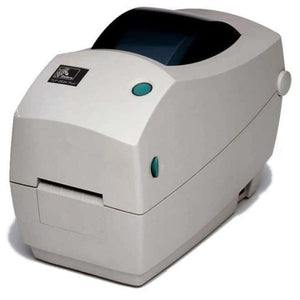
We supply label, receipt and industrial printers from Zebra, SATO, Bixolon, Epson and Star Micronics with the exact manufacturer part number and the interface set stated on every line, so you receive the connectivity you specified rather than the closest available variant.
Tell us what will print to it and where it sits, and we will confirm the part number before you order. Send a bill of materials through the bulk quote page or email sarah.jane@techsellerusa.com.
Common questions
Should I choose USB or Ethernet for a label printer?
USB where one PC sits next to the printer and nothing else needs to print to it. Ethernet for anything else, including any case where a WMS, ERP or second workstation prints to it, because Ethernet also gives you a remote management and diagnostic path.
Why did my network printer stop working after a power cut?
Most commonly the address changed. A printer on DHCP can come back on a different address, and any system configured to print to the old one stops. Set a static address on the printer or a DHCP reservation against its MAC address.
Is wireless reliable enough for a production label printer?
It can be, but a print job tolerates interruption badly — a dropped association mid-job gives a partial label or a lost job. Coverage adequate for handheld scanners is not automatically adequate for a printer. Survey at the printer's actual position, and prefer Ethernet where a drop is possible.
Can I add Ethernet to a printer that did not come with it?
On some ranges yes, through a model-specific interface module with its own part number. On many the interface set is fixed at manufacture and encoded in the printer's part number, in which case it cannot be added. Check the model before assuming either way.
Do I still need serial for anything?
Where the printer attaches to scales, weighing systems, PLCs, production controllers or older POS terminals that output serial and nothing else. If that equipment is not changing, matching the existing interface is lower risk than adding a converter.
Two printers have the same model name but different part numbers. Why?
Usually resolution, connectivity or regional power configuration. Interface set is one of the main variables encoded in an industrial printer's part number, so quote and order against the full part number rather than the model name.
Tell us what will print to it and we will confirm the interface before the order goes through.