Toshiba B-EP2DL Mobile Label Printer Guide

Almost nobody shops for a Toshiba mobile label printer in the abstract. People pick a Zebra or a Honeywell when they start from nothing and want the default. They arrive at a Toshiba for a different reason: one is already in the building, or a site was inherited with a handful of them, and somebody now has to decide whether it joins the fleet or becomes a problem.
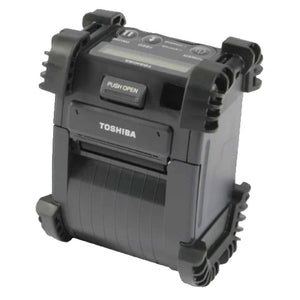
The Toshiba B-EP2DL is a 2 inch mobile thermal label printer. Our record covers part number B-EP2DL-GH32-QM-R, a 2 inch maximum print width, USB and Bluetooth, 1.1 lbs, refurbished condition and a 30-Day Tech Seller USA warranty. That is the whole of what we list, and this article is written around that fact rather than around it.
What our listing confirms, and what it does not
We would rather be useful than complete, and a specification sheet we cannot stand behind helps nobody. Here is the boundary.
Confirmed. Part number, manufacturer, product family, a 2 inch maximum print width, USB and Bluetooth connectivity, 1.1 lbs, refurbished condition and the warranty. The table below sets them out.
Not recorded. Print resolution. Print speed. Battery capacity or rated runtime. Any drop rating or IP ingress rating. The printer command language. Media roll capacity or maximum roll diameter. And the meaning of the GH32-QM-R portion of the part number, which on part numbers of this shape normally encodes some mix of region, interface and accessories, but which we will not decode for you because we do not have the decode sheet in front of us.
Those gaps matter, so this article names each one where it would affect a decision, says why it matters, and tells you to confirm it on the specific unit. If you are replacing a printer already running in a live process, that confirmation is not optional. Ask us, or read it off the configuration printout of the printer you are matching.
What does not depend on those numbers is the useful part: how a 2 inch mobile printer behaves in service, what Bluetooth as the only wireless interface means for deployment and support, and what to do with one brand sitting inside a fleet built on another. That last subject is why most people are here.
What our record confirms
| Part Number | B-EP2DL-GH32-QM-R |
| Manufacturer | Toshiba |
| Product Family | B-EP2DL |
| Product Type | Mobile Thermal Label Printer |
| Max Print Width | 2 inches |
| Connectivity | USB, Bluetooth |
| Weight | 1.1 lbs |
| Condition | Refurbished |
| Warranty | 30-Day Tech Seller USA |
| Print Resolution | Not recorded in our listing. Confirm before purchase. |
| Print Speed | Not recorded in our listing. Confirm before purchase. |
| Battery Capacity or Runtime | Not recorded in our listing. Confirm before purchase. |
| Drop Rating or IP Rating | Not recorded in our listing. Confirm before purchase. |
| Command Language | Not recorded in our listing. Confirm before purchase. |
| Media Roll Capacity | Not recorded in our listing. Confirm before purchase. |
| Meaning of GH32-QM-R suffix | Not recorded in our listing. Confirm before purchase. |
Treat the lower half of that table as the checklist for the conversation before ordering. Those figures are knowable for the individual unit. They are simply not in our record.

SKU: B-EP2DL-GH32-QM-R | Refurbished | Mobile thermal, 2 inch max print width | USB / Bluetooth | 1.1 lbs | 30-Day Tech Seller USA warranty
View Details & Request a Quote →1.1 lbs, and what a genuinely light printer changes
Weight is the one hard number in our record that says something immediate about how the unit will be used, and 1.1 lbs is light. On a mobile printer, weight is not a spec in the way resolution is. It is an ergonomic constraint that decides whether the device gets worn or abandoned.
The comparison that matters is between a worker who ends the shift still wearing the printer and one who takes it off after two hours and walks back to a shelf for every label. The second outcome destroys the business case, because the point of going mobile is that the label is made where the work happens. Once the printer lives somewhere other than on the person, you have bought a desktop printer with a battery in it.
Weight is also carried asymmetrically: a belt mounted printer hangs on one hip, and a pound on one side of the body for eight hours feels nothing like a pound in a backpack, especially with a handheld, a scanner and a radio already on the belt. Heavier 4 inch mobile printers exist for good reasons, but they get set down more often.
The 2 inch width is the other half of the decision. It covers shelf edge and price labels, small parts and bin labels, specimen labels and most single item picking labels. It does not cover a full carrier shipping label, and shrinking artwork to fit is how unscannable barcodes get created. Our mobile label printer buying guide covers where the two classes divide.
What weight cannot tell you is how the unit survives a fall, because our listing records no drop rating and no IP ingress rating. That is a material gap for a device defined by being carried, and one that will meet hard floors, dust and rain at a loading door. Confirm rated drop height, ingress protection and whether a case is included before deploying it anywhere rough.
USB and Bluetooth, with no Wi-Fi in our record
Our record lists USB and Bluetooth. It does not list Wi-Fi. Plan on that basis and confirm the interfaces on the unit, because the consequence is not minor: it changes the deployment model, the support model and the failure model.
A Wi-Fi printer is a network device: it has an address, it is reachable from a server, it can be discovered, monitored and configured centrally, and the job comes from the application. A Bluetooth printer is a peripheral. It belongs to a host, normally a handheld or a phone, and the job comes from that host. The printer does not follow the network. It follows the host.
Pairing models. In one to one pairing, each worker has a handheld and a printer paired permanently. It is the simplest to support: the relationship is fixed and there is no contention. The cost is a printer per handheld, and a fault takes that worker out of action until a spare appears.
In the shared model, one printer serves several hosts, paired in turn or connected on demand. That costs less hardware and suits occasional labelling, such as a receiving bay. The cost is contention: two hosts wanting the printer at once, jobs landing on the wrong printer, and someone crossing a building to find their paired printer on a bench in the next aisle. It also makes it hard to know which printer produced a given label, which matters if labelling feeds a traceability chain.
The paired host is the real point of failure. The printer is only as available as the device it is paired with. If the handheld is swapped, repaired, reimaged or replaced, the pairing does not come with it, and whoever redoes it is usually a supervisor who does it once a year. Across a handheld fleet on a rolling replacement cycle that is a recurring support task nobody has written down. The print path is the same story: a Bluetooth printer is driven by a print service, a driver or an application on the host, so a platform change means revalidating it. A network printer is largely indifferent to a handheld refresh. A paired printer is not.
The answers are unglamorous. Write the pairing procedure as a short runbook a supervisor can find, record which printer is paired to which host by serial number in the same asset register as the handhelds so a handheld replacement flags a printer that needs repairing, mark printer and host with matching identifiers, and test the procedure on a new host before the first real swap.
USB is not a throwaway detail. On a mobile printer it is the configuration and recovery path rather than the production one: reading or writing configuration, applying firmware, and proving the printer works when Bluetooth is misbehaving. That last use justifies the cable on its own, because a test label over USB separates a printer fault from a pairing fault in about a minute.
The mixed brand fleet problem
Here is the heart of it. If you are considering a Toshiba mobile printer, the rest of your estate is probably not Toshiba, so you are looking at running more than one brand. This is not brand loyalty. The costs are concrete and they show up in five places.
Command languages. Every brand has its own printer command language: the text an application sends to describe a label. Layout, fields, barcode definitions and control codes are expressed in it and are not interchangeable between brands. If your warehouse system emits templates for one brand and you add a second, something has to generate the second language too, whether a driver, a middleware layer, a label design package with multiple output targets or a developer writing a second template set. Some printers emulate a rival language, which solves this neatly, but our record does not state the command language or any emulation support for this unit, so ask rather than assume.
Configuration utilities. Each brand ships its own tool for setup, configuration and firmware, and they are not compatible. Two brands means two utilities, on two sets of laptops, with two sets of people who know how to use them. That cost scales with the number of people who must be competent, not the number of printers, so it is an afternoon for three printers and a permanent overhead for two hundred.
Drivers and print paths. Whatever sits between application and printer has to exist, be tested and be maintained for each brand through every platform change. On mobile that is compounded by the hosts, because a driver that behaves on a desktop may behave differently on a handheld operating system. Every platform update becomes a matrix rather than a line.
Media paths and consumables. This is the one that bites unexpectedly. Different printers take different roll widths, core diameters and maximum outside diameters, and place gap and black mark sensors differently, so a label that runs perfectly on one brand may need a different liner, gap or mark position on another. That means a second catalogue line, a second reorder point and a second stack of boxes in the stores. It also means the day somebody grabs the wrong box and half a shift goes into diagnosing a printer that was never faulty.
Spares, training and muscle memory. Printheads, platen rollers, batteries, chargers, belt clips and cases are brand and usually model specific, so a second brand means a second set of spares held against fewer units, which is poor value. Training splits the same way: loading media, clearing a jam, reading status lights and running a self test are all done differently, and the worker who knows one brand cold is slower on the other. With staff turnover, that difference is permanent.
The fair summary is that a second brand roughly doubles the fixed costs of running printers while doing nothing to the variable ones. If your fleet is small, that doubling barely registers. At scale, with formal support processes and an integrated application, it is expensive and permanent. That is why our Zebra mobile printer guide, our Honeywell and Intermec PM series guide and our TSC range guide all reach the same advice: pick a standard and hold it unless you have a reason not to.
When a mixed fleet is the right call anyway
You inherited the estate. The most common case. A site or contract arrives with printers already integrated, stocked with media and understood by the people using them. Replacing working hardware is not free: it costs the hardware, the integration work, the retraining, the media written off and the disruption, and buys a standardisation benefit that may take years to repay. Running inherited units to end of life and standardising at replacement is very often the correct financial answer.
The site has a genuinely different job. A remote depot doing occasional 2 inch labelling has little in common with a despatch operation running 4 inch carrier labels all day. Forcing one choice across both means one of them carries capability it does not need or lacks capability it does.
One brand fits one workflow better. Sometimes the fit is real: a form factor, a media handling arrangement, an integration that already exists. If a printer genuinely suits a workflow that matters, the extra support burden may be worth it. And a single brand policy is a single point of failure in procurement, which is why operations caught out by supply constraints often keep a qualified second brand.
The distinction worth holding onto is between a mixed fleet that was decided and one that was allowed to happen. A decided mixed fleet has documented reasons, a support model for each brand and a plan for each unit. An accidental one has a drawer of orphan printers that nobody can configure and nobody will throw away.
Bringing a single outlier printer into an existing fleet
So you have one Toshiba, or a handful, alongside a fleet of something else. Here is how to keep it useful instead of letting it become an orphan.
Decide its status first, and say so out loud. Either it is a long term member of the fleet, and deserves spares, documentation, trained people and a place in the consumables catalogue, or it is a unit you run to end of life and do not replace, with thin support accepted and a plan for the day it stops. Both are legitimate. What fails is leaving the question open, because then it carries fleet level expectations with no fleet level support behind it.
Document the configuration before it goes into service. Capture it while the printer is working: media type and size, sensor mode, darkness, speed, interface settings and firmware level. Rebuilding a lost configuration by trial and error on a brand your team does not use daily can take a day. Recovering it from a stored printout takes minutes.
Keep a spare, or accept the downtime explicitly. In a single brand fleet any printer covers for any other. An outlier has no cover. If the work cannot stop, the protection is a second unit in a cupboard, configured identically and charged. If that is not worth it, write down which process falls back to what when the unit fails, and for how long that is tolerable.
Identify the media and stock it properly. Record roll width, core diameter, maximum outside diameter, liner or linerless, gap or black mark, and the part number of media you have actually tested in the unit, then stock it as a real line item with a reorder point. Outlier printers die of media starvation more often than of mechanical failure.
Name a second person, and keep it in the register. One person knowing how to run the odd printer is the same as nobody knowing. Hold serial number, location, paired host, media, warranty status and configuration file in the same register as everything else, because hardware outside the register does not get reviewed, budgeted or replaced on time. Our Bixolon range guide makes the same point about satellite fleets.
Media for a 2 inch mobile printer
Media on a mobile printer is a different problem from media on a desktop unit, because the roll has to live inside something you are wearing.
Roll diameter against reload frequency. A bigger roll means fewer reloads and a heavier printer; a smaller roll means a lighter unit and more interruptions. Which way to go depends on labels per shift and on how disruptive a reload is where the work happens: at a bench it is nothing, halfway up a rack on a ladder it is a real problem. Labels per shift divided by labels per roll gives reloads per shift, and that is the number to design around. Our listing does not record media roll capacity or maximum roll diameter, so confirm it on the specific printer.
Liner against linerless as a category choice. Conventional labels come on a silicone backing that peels away and becomes waste. Linerless media carries adhesive on the back of the label itself, so a roll of the same diameter holds substantially more labels and no backing paper hits the floor. Both matter on a mobile printer. The trade is that linerless needs a printer built for it, with the right platen, cutter arrangement and media path coating, and it is less tolerant of adhesive going where it should not. That is a printer level choice, so confirm what the unit supports before buying rolls.
Match the media to the job. A 2 inch mobile printer is a direct thermal device, and direct thermal output fades with heat, light and abrasion. For a pick label read within days that does not matter. For anything expected to stay readable for months or years it matters completely, and no darkness setting changes the chemistry. Decide the required label life first, then the media, then the printer.
The battery is a consumable, not part of the printer
The most useful shift when buying any mobile printer is to stop thinking of the battery as part of the device and start thinking of it as a consumable that happens to be bolted on.
Batteries age on two clocks at once, charge cycles and calendar time, and a pack loses capacity even sitting on a shelf, so runtime is a moving figure. A unit that comfortably covered a shift when new may cover most of a shift two years later, and the failure presents as an operational complaint rather than a hardware fault: labels stop appearing late in the day and the worker assumes the printer is broken.
Our listing does not record battery capacity or rated runtime, and for a refurbished unit those figures would only ever be a starting point, because what matters is the health of the actual pack you receive. Ask what battery is supplied, whether it is original or a replacement, and whether replacement packs are obtainable. That last question is the important one for any older mobile printer: a unit whose battery cannot be replaced has a defined remaining life whatever else is true about it.
Run a swap pool rather than charging in place. Spare packs and a charging bay, with packs coming off charge at the start of a shift and going back on at the end. The printer never sits still to charge, and a tired pack takes one printer out of rotation instead of stopping the work.
Test runtime under real workload. An idle printer consumes very little; one printing continuously consumes a great deal, and darkness, label length and media type all move the figure. The only runtime number worth trusting is one you measured on your media at your labels per hour. Do it on arrival, record it as the baseline, repeat it annually. The drop is the pack ageing, and it tells you when to buy replacements before anybody complains.
Arrival checks and commissioning a refurbished mobile unit
Mobile printers live harder lives than desktop ones, so the arrival inspection should be more thorough. Work through this before the unit is issued to anybody.
Printhead. Check visually for scoring and adhesive residue, then prove it by printing a solid black block across the full 2 inch width. A thin white line down every label is a burnt out element and cleaning will not recover it. Patchy output across the whole width is more often media, pressure or a dirty head, so clean it with the correct solvent and reprint before concluding anything.
Platen roller. Turn it through a full revolution and feel for flat spots, hardening, cracking or adhesive build up. The platen drives the media, so a bad one shows up as tracking drift, inconsistent darkness or skewed labels, and it is misdiagnosed as a printhead fault more often than anything else.
Media door, latch and hinge. This part has been opened thousands of times and dropped while open. Check the latch holds, the hinge is not cracked, and the door closes with even pressure across its width. A door that does not close square lets media wander and dust in, and on a worn unit it is the likeliest physical defect.
Charging contacts, connector and carry parts. Inspect the contacts for pitting, corrosion or bent pins, and the USB port for a loose shell. Contacts that make intermittently give the worst class of fault: a printer sometimes charged and sometimes not, blamed on the battery for weeks. Check the belt clip, case and strap at the same time, because a broken clip is why a printer ends up on a shelf instead of on a person.
Full test print on production media. Not the manufacturer's test pattern: your label, your media, your barcode data, scanned with the scanner that will read it in production rather than with a phone. A label that looks right and does not scan is the most expensive kind of pass.
Battery runtime under real workload, and record the number. This is your baseline for the life of the unit.
Record the configuration before it goes out. File the configuration printout, firmware level and serial number with the asset record alongside the runtime baseline and the media part number. On an outlier brand this pays back the most, and it is the step most often skipped because the printer works and somebody is waiting for it.
Confirm the gaps. Before the unit enters a live process, get confirmation of what our listing does not record: resolution, print speed, battery capacity, drop and ingress ratings, command language, media capacity and what the GH32-QM-R suffix denotes on the unit you are receiving.
Ordering
We supply B-EP2DL-GH32-QM-R refurbished with a 30-Day Tech Seller USA warranty. Tell us your label size, how many labels a worker prints in a shift, what handheld or phone it will pair with and what else is in your fleet, and we will confirm the configuration and the unrecorded details on the actual unit before you order. Browse the Toshiba printer range, and if you are deciding between brands rather than within one, start with our mobile label printer buying guide.
Common questions
What is the Toshiba B-EP2DL used for?
It is a 2 inch mobile thermal label printer, worn or carried so labels are produced at the point of work rather than at a bench. Typical uses are shelf edge and price labels, small parts and bin labels, picking labels and delivery receipts. Two inches is not wide enough for a full carrier shipping label.
Does the Toshiba B-EP2DL have Wi-Fi?
Our record lists USB and Bluetooth only, and does not list Wi-Fi. Plan on that basis and confirm the interfaces on the specific unit. The consequence is that the printer is a peripheral of a paired host rather than a device on the network, so it cannot be discovered, monitored or configured centrally, and the paired handheld or phone becomes the thing that has to be managed.
What print resolution and print speed does the B-EP2DL have?
Our listing does not record either figure, and we will not estimate them. Both matter: resolution decides whether small text and 2D barcodes stay readable on a 2 inch label, and speed decides how long a worker waits at each labelling point. Ask us to confirm both on the specific unit.
Is it worth running a Toshiba printer alongside a fleet of another brand?
A second brand roughly doubles the fixed costs of running printers: a second command language, a second configuration utility, a second driver path, a second media line and a second set of spares and training. That barely registers on a small fleet and is expensive at scale. It is often still the right call for an inherited estate or a site with a genuinely different job, because replacing working hardware is not free.
What should I check when a refurbished mobile label printer arrives?
Printhead, by printing a solid block across the full width; platen roller for flat spots and adhesive; media door, latch and hinge; charging contacts and the USB port; belt clip and case. Then test print on your production media and scan it with your production scanner, measure battery runtime under real workload as a baseline, and record the configuration and firmware level before the unit is issued.
Send us your label size, your labels per shift and the host it will pair with, and we will confirm the configuration before quoting.