Barcode Scanner Range: Depth of Field and Optics Explained

Scanner datasheets quote a working range, and buyers reasonably assume it means the scanner reads barcodes up to that distance. It does not. Depth of field is not a property of the scanner alone. It is a property of the scanner and the specific barcode together, and the same unit that reads a pallet label across an aisle may be unable to read a small product code at the same distance.
This guide explains what actually determines read distance, why there is a minimum distance as well as a maximum, how the optics classes differ, and how to specify a scanner against your real worst case instead of a number on a sheet.
The variable everyone leaves out
The single biggest factor in read distance is not the scanner. It is the X-dimension of the barcode, which is the width of the narrowest bar or, on a 2D code, the size of one module.
Larger modules are easier to resolve from far away, in the same way large text is readable from across a room. That is why a warehouse pallet label printed with wide bars can be read from several metres, while a tiny code on a component may need the scanner almost touching it, using the identical device.
This is why a manufacturer's range figure is always quoted against a stated X-dimension, and why comparing two scanners on headline range alone tells you very little unless both figures refer to the same code size.
The practical consequence is that you can often fix a range problem at the label instead of the scanner. Printing the same data with a larger X-dimension, or choosing a less dense symbology, can extend read distance far more cheaply than buying long-range hardware. Our guides on barcode label design and barcode symbologies cover the trade-off between density and readability.
There is a near limit too
Depth of field has two boundaries, and the near one catches people out.
A long-range scanner focused for distance frequently cannot read a code held against its window. Buy long-range optics for a warehouse and give one to someone working at a bench, and they will report the scanner as broken because it will not read anything close up.
High-density optics have the opposite profile: excellent at very small codes close in, poor at anything beyond arm's length.
So the question is never just how far. It is the full span the device has to cover, from the closest code it will meet to the furthest.
The optics classes
Vendors use their own suffixes, but the categories are consistent.
Standard range covers roughly contact out to a metre or so on ordinary retail and logistics codes. It is the right default for point of sale, receiving desks, offices and general handheld work, and it is what most corded scanners ship as.
High density is optimised for very small X-dimensions: electronics, pharmaceutical unit doses, laboratory vials, small component labels. Good close in, limited at distance.
Long range and extended range are built for warehouse work, reading rack and location labels from the floor or from a forklift. These trade away close-up performance and cost noticeably more.
Direct part marking optics handle codes etched, dot-peened or laser-marked into metal and plastic, where there is no printed contrast at all and the read depends on controlled illumination. Our guides on manufacturing barcode hardware and aerospace MRO traceability cover DPM in practice.
Getting this wrong is expensive because the optics are usually fixed at the point of order. A scanner cannot be converted from standard range to long range later. Our guide on identifying scanner variants covers reading the optics class off a part number, which matters when buying used.
Laser, imager and autofocus
Linear laser scanners historically held an advantage on long-range 1D reading. They cannot read 2D codes at all, which rules them out wherever QR or Data Matrix appears.
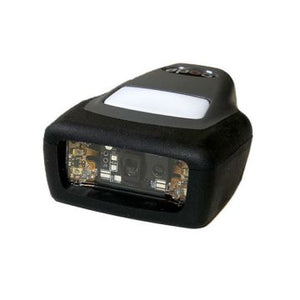
Imagers take a picture and decode it. They read 1D and 2D, tolerate damaged or poorly printed codes better, and read from a screen, which lasers cannot do reliably. Modern long-range imagers have largely closed the distance gap.
Autofocus units adjust focus dynamically and give a much wider usable span than fixed-focus optics, at the cost of a small delay while focusing. On a high-throughput lane that delay is a real consideration; for mixed-distance work it is usually worth it.
Our barcode scanner buying guide covers the wider selection question including form factor and durability.
What else shortens your real range
Datasheet figures come from a lab. Your site is not one.
Print quality. A code printed too dark, with bars spreading into spaces, loses range before it loses readability entirely. Our guide on print darkness and speed covers the tuning, and barcode verification covers measuring it properly.
Contrast and substrate. Black on white is the reference case. Coloured stock, glossy laminates and clear labels on reflective surfaces all reduce effective range.
Angle. Range figures assume the scanner is roughly square to the label. A code viewed at a steep angle, which is normal from a forklift, reads at a shorter distance than the specification implies.
Ambient light. Direct sunlight and strong overhead lighting can wash out the scanner's own illumination. Outdoor and yard environments regularly underperform indoor testing. See outdoor and site hardware.
Curvature and wrinkle. A label on a drum, a shrink-wrapped pallet or a creased carton distorts the code and costs distance.
Field of view widens with distance. At long range the scanner sees a wide area and may pick up a neighbouring label instead of the intended one. In dense racking this causes wrong-location scans that look like operator error.
Specify against your worst case
A short process that avoids most of these problems:
Measure the extremes. Not the average. The top rack position from floor level, the deepest pallet in a bay, the closest code on a bench. Both ends of the span.
Collect real labels. Every distinct type the device will meet, including the worst-printed one and the oldest faded one, not a freshly printed sample.
Measure the X-dimension of the smallest code that has to be read at the longest distance. That pairing is the binding constraint and it is what a vendor needs in order to answer the question properly.
Test on site before committing to a fleet. Ask for an evaluation unit and test in the actual aisle, under the actual lighting, at the actual angles. A scanner that works on a desk in an office proves nothing about a yard at midday.
Consider the form factor alongside the optics. If operators are reading high rack positions from a vehicle all shift, a vehicle-mount or wearable device may serve better than a handheld regardless of range. See wearable and vehicle-mount devices.
If reads are failing on an existing deployment, our barcode not scanning troubleshooting guide works through the causes in order.
Sourcing
We supply corded, cordless, rugged, presentation and long-range barcode scanners from Zebra, Honeywell and Datalogic, in the optics class your application actually needs. Tell us the shortest and longest read distances and send us a sample label, and we will specify the optics rather than quoting a headline range figure. Request a bulk quote or email sarah.jane@techsellerusa.com.
Common questions
What is depth of field on a barcode scanner?
It is the span of distances over which a scanner can successfully read a barcode, and it has both a near and a far limit. Critically it is not a fixed property of the scanner: it depends on the barcode as well, particularly the X-dimension, which is the width of the narrowest bar or the size of one module. The same scanner has a very different depth of field on a large pallet label than on a tiny component code.
Why will my long-range scanner not read up close?
Because long-range optics are focused for distance and have a near limit as well as a far one. A code held against the window can sit inside that near limit and be unreadable. This is normal behaviour rather than a fault, and it is why long-range units are a poor choice for bench or desk work. If the same operators handle both close and distant codes, look at autofocus optics, which cover a much wider span.
How can I increase read distance without buying new scanners?
Change the label. Increasing the X-dimension, meaning printing the code larger, extends read distance substantially and usually costs nothing but label real estate. Choosing a less dense symbology for the same data has a similar effect. Improving contrast and fixing over-dark printing also helps. For long-range warehouse labels these changes are frequently cheaper and more effective than upgrading the hardware.
Laser or imager for long range?
Imager, in almost all new deployments. Linear lasers historically had a long-range advantage on 1D codes, but they cannot read 2D codes at all and cannot reliably read from a screen. Modern long-range imagers have largely closed the distance gap while reading 1D and 2D, tolerating damaged or poorly printed codes better. Choose a laser only if the application is strictly 1D and a specific model demonstrably outperforms on your codes.
The scanner reads the wrong rack label. What causes that?
Field of view widening with distance. At long range the scanner sees a wide area and can capture a neighbouring label instead of the intended one, particularly in dense racking where locations sit close together. It usually gets reported as operator error. Options are aiming assistance to show exactly what is targeted, greater physical separation between labels, or location prefixes that let the software reject an out-of-context scan.
Can the optics be upgraded later?
No. The scan engine and its optics class are fixed when the unit is manufactured, so a standard-range scanner cannot be converted to long range or high density afterwards. That makes the optics decision one of the few genuinely irreversible choices in a scanner purchase, and it is why testing an evaluation unit on site before committing to a fleet is worth the delay. It also matters when buying used, since the optics class is identified in the part number rather than being visible on the housing.
Send us your shortest and longest read distances plus a sample label, and we will specify the optics class against your real worst case.