MO001600JWUFV HPE 1.6TB SSD: Fit, Carrier and Endurance

The MO001600JWUFV is an HPE-coded 1.6TB SSD for ProLiant servers. Most of what decides whether it is the right part has nothing to do with capacity, so this covers what actually matters before ordering.
What the part number tells you
HPE SSD part numbers carry a prefix indicating the endurance class the drive was built for, and this is the single most useful thing to read.
An MO prefix indicates a mixed use drive — built for workloads with a meaningful proportion of writes, rather than read-intensive ones. HPE's other prefixes cover read-intensive and write-intensive classes, and they are not interchangeable in the sense that matters: a read-intensive drive placed under a write-heavy workload wears out early.
The rest of the number encodes the capacity and the drive family. Confirm the exact interface, form factor and endurance rating against the label on the drive or the HPE quickspec for your platform — our part numbers guide covers why the number rather than the specification is what you order against.
Endurance is the specification that matters
More than capacity, more than headline speed.
SSD life is consumed by writing. A drive is rated for a certain amount of writing over its warranted life, expressed as drive writes per day or total bytes written — our endurance guide covers both.
The practical method is straightforward: measure what your workload actually writes per day, divide by the drive capacity, and compare against the rating. Most people find their workload is considerably less write-heavy than they assumed, and some find the opposite.
A mixed-use drive suits workloads sitting between the two extremes — virtualisation datastores, busy application servers, general-purpose database work. For a backup target or an archive tier that is written once and read occasionally, it is more drive than the job needs.
The carrier is part of the part
The most common wrong-part situation on ProLiant equipment.
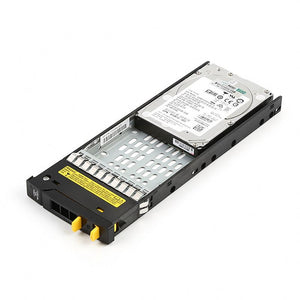
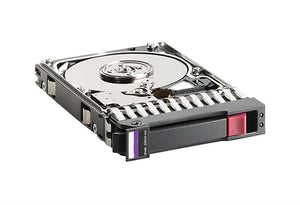
HPE server drives ship in a Smart Carrier tray, and the carrier generation must match your chassis generation. A drive with the correct capacity, interface and endurance class will still not seat if the tray is from a different generation.
Two things follow.
Carrier generation is encoded in the part number rather than stated in most descriptions.
Establish your generation before ordering. Our model naming guide covers finding it, and the fastest route is a photograph of the chassis label.
If you are replacing a failed drive, the most reliable action is to pull a working one and photograph its label — that carries the carrier generation, the firmware level and the exact part number together.
Firmware validation on Smart Array controllers
HPE Smart Array controllers are among the stricter platforms at checking drive firmware.
A drive without HPE coding may work, may be flagged as unsupported in iLO, may not report predictive failure warnings, or may be refused during an array rebuild — which is the worst moment to discover it. Our compatibility guide covers why this catches people.
That is the case for an HPE-coded drive like this one rather than a bare manufacturer equivalent. Where you are running a Smart Array controller, the coding is what you are paying for.
Note also that MSA array drives are a separate matter. An MSA controller expects array-specific firmware and will report a standard ProLiant server drive as unsupported. The part numbers differ even at identical capacity — our compatibility page lists both.
Where this drive fits, and where it does not
Being direct, because the wrong tier costs money in both directions.
Good fit: virtualisation datastores with mixed read and write, application servers, transactional workloads where latency matters, and any tier where mechanical drives are the current bottleneck. Our SSD versus HDD guide covers where flash genuinely pays.
Poor fit: backup targets, archives, and bulk capacity tiers. Those are capacity problems rather than latency problems, and nearline drives serve them at a fraction of the cost per terabyte.
Worth reconsidering: if the workload is genuinely read-dominated, a read-intensive class drive costs less and lasts as long in that role. Buying mixed-use endurance you will not consume is money spent on nothing.
Mixing with existing drives
Three points if this is joining an existing array.
A RAID group runs at its slowest member. Adding this drive to a group of mechanical drives gains very little — build a separate group rather than mixing tiers, as our RAID guide covers.
Match capacity within a group. A group sized to its smallest member wastes the difference.
Check the controller supports it. Older Smart Array controllers may not support SSDs well or at all, and some cap performance in ways that make the upgrade pointless — our controller guide covers identifying what is fitted.
Before you order
Your ProLiant model and generation. The part number from a currently fitted drive, or a photograph of its label. What controller is fitted. What your workload actually writes per day, if you know it. And whether you need the carrier, or have an empty one — our backplanes and caddies guide covers why empty bays rarely come with trays.
Common questions
What does the MO prefix mean?
It indicates a mixed use endurance class — built for workloads with a meaningful proportion of writes rather than read-dominated ones. HPE uses different prefixes for read-intensive and write-intensive drives, and the classes are not interchangeable in practice.
Will it fit any ProLiant server?
Not necessarily. The Smart Carrier generation must match your chassis generation, and carrier generation is encoded in the part number rather than the description. Establish your server generation first, or photograph the label on a fitted drive.
Can I use a non-HPE SSD instead?
It may work, and Smart Array controllers are strict about firmware. A non-coded drive may be flagged as unsupported, may not report predictive failure warnings, or may be refused during an array rebuild. On a Smart Array controller the coding is what you are paying for.
Is mixed use the right endurance class for me?
Measure what your workload writes per day, divide by capacity and compare against the rating. If the workload is genuinely read-dominated, a read-intensive drive costs less and lasts as long in that role — buying endurance you will not consume is money spent on nothing.
Can I add it to my existing array?
A RAID group runs at its slowest member, so adding an SSD to a group of mechanical drives gains very little. Build a separate group instead, and check that your controller supports SSDs properly — older Smart Array controllers may cap performance.
Send us your ProLiant model and generation, or a photograph of the label on a fitted drive, and we will confirm the carrier and firmware match before you order.