Direct Thermal vs Thermal Transfer: Which Printing Method

Almost every label printer in industrial and retail use prints one of two ways, and choosing the wrong one is the single most common mistake in label hardware. Direct thermal burns an image into heat-sensitive paper. Thermal transfer melts wax or resin off a ribbon onto the label. The printers look similar, the labels look similar on day one, and six months later one of them is blank.
This guide explains how each method works, where each belongs, what the cost comparison actually looks like once consumables are counted, and how to tell which method an existing printer or label is using.
How the two methods work
Direct thermal uses label stock coated with a chemical layer that darkens when heated. The printhead applies heat directly to the label and the image appears. There is no ribbon and no ink. Fewer consumables, fewer parts, less to get wrong at the operator level.
Thermal transfer puts a ribbon between the printhead and the label. The printhead heats the ribbon, and the coating on the ribbon melts and bonds to the label surface. The label itself is ordinary material and carries no heat-sensitive coating.
That single structural difference drives every practical consequence below.
Durability is the real dividing line
A direct thermal label will darken and fade. The same chemistry that lets the printhead create an image lets heat, sunlight, friction and some solvents create one too, or wipe one out. Leave a direct thermal label on a dashboard in summer and it turns black. Leave it in a warehouse for a year and it fades toward illegible. Rub it against a carton in transit and it scuffs.
That is not a defect. Direct thermal is designed for labels with a short life, and within that life it is entirely reliable.
A thermal transfer label lasts as long as the ribbon chemistry and the label material allow. With resin ribbon on a synthetic label, the print survives abrasion, moisture, heat and many chemicals for years. That is why asset tags, chemical drum labels and anything meant to be readable after a long time are printed this way.
Where each one belongs
Use direct thermal for: shipping labels that get scanned within days, receipts, retail shelf edge labels, visitor badges, food service date labels, ticketing, and picking or putaway labels consumed the same shift. Anything read soon and then discarded.
Use thermal transfer for: IT asset tags, product and compliance labels, chemical and GHS labels, outdoor and cold chain applications, laboratory labels that go through autoclave or freezer, anything applied to a product that leaves your building, and anything that has to be scannable in a year. Our guides on IT asset tagging, laboratory labelling and cold chain hardware cover those environments in detail.
The awkward middle is shipping. Carrier labels are overwhelmingly direct thermal because they only need to survive the journey, and that is correct. But a parcel sitting in a hot trailer or an outdoor yard for days can fade enough to fail a scan. If your parcels sit, test before you standardise. See shipping label compliance.
The cost comparison people get wrong
Direct thermal looks cheaper because there is no ribbon to buy. Per label, that is often not true.
Direct thermal label stock costs more than plain thermal transfer stock, because it carries the heat-sensitive coating. Thermal transfer splits the cost between cheaper labels and a ribbon. Depending on label size, ribbon type and how much of the label is actually printed, the total per label can land either way, and on high volumes thermal transfer is frequently the cheaper of the two.
Where direct thermal genuinely saves is operational. No ribbon means no ribbon changes, no ribbon wrinkle, no running out mid-shift, no operator loading it the wrong way round, and one fewer consumable to stock. In a high-throughput shipping operation those savings are real and often decisive. Our guide on managing label consumables covers the stocking side.
Printhead life
This one surprises people: thermal transfer is usually gentler on the printhead. The ribbon passes between the head and the label, acting as a barrier against the abrasive label surface and carrying away some heat. In direct thermal the head is in direct contact with the label material at every pass.
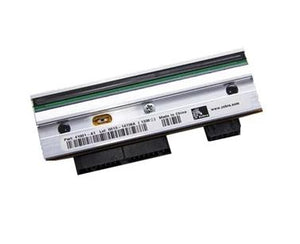
Direct thermal media is also more likely to leave residue on the head, which is why cleaning schedules matter more on direct thermal machines. Our guides on thermal printer maintenance and printhead failure and replacement cover the cleaning routine and what early wear looks like.
Choosing the ribbon, if you go thermal transfer
Thermal transfer adds a decision direct thermal does not have, and getting it wrong wastes both ribbon and printheads.
Wax is the cheapest and suits paper labels with light handling. Wax-resin is the general-purpose middle ground with better smudge and scratch resistance, and is what most coated paper and some synthetic applications use. Resin is for synthetic labels that need chemical, heat and abrasion resistance, and it requires higher printhead energy.
The ribbon and the label must be matched to each other, not chosen separately. Resin ribbon on uncoated paper will not bond properly; wax ribbon on synthetic film will wipe off. Our guide on label media and ribbon selection works through the combinations.
One practical rule: the ribbon should be at least as wide as the label. A ribbon narrower than the media leaves the printhead in direct contact with the label at the edges, which wears those elements out early and produces the classic vertical line failure.
How to tell what you already have
The scratch test on the label. Scratch the printed surface firmly with a fingernail or a coin. Direct thermal will typically darken where you scratched, because friction generates heat. Thermal transfer will not.
Look inside the printer. A ribbon carriage with supply and take-up spindles means the machine is capable of thermal transfer. Most such printers can also run direct thermal with the ribbon removed and the setting changed.
Check the mode setting. Printers that support both have a media type setting, and a mismatch is a common support call. Direct thermal media in a printer set to thermal transfer wastes ribbon and prints poorly. Thermal transfer media in a printer set to direct thermal produces a blank label, because plain stock has nothing to react.
If the label comes out blank, check that setting before you conclude the printhead has failed.
Sourcing
We supply industrial, desktop and mobile label printers from Zebra, SATO, Honeywell, Bixolon, Epson and others, in both direct thermal and thermal transfer configurations, plus printheads and spares. If you are unsure which method your application needs, tell us what the label is for, where it ends up and how long it has to stay readable, and we will specify it before you order. Request a bulk quote or email sarah.jane@techsellerusa.com.
Common questions
What is the difference between direct thermal and thermal transfer?
Direct thermal prints by heating chemically coated label stock so the image appears in the label itself, with no ribbon. Thermal transfer uses a ribbon: the printhead melts wax or resin off the ribbon and bonds it to an ordinary label. Direct thermal is simpler and has fewer consumables but fades with heat, light and abrasion. Thermal transfer costs more to set up and lasts far longer.
Which one should I use for shipping labels?
Direct thermal, in almost all cases. Carrier labels only need to stay readable for the duration of the journey, and dropping the ribbon removes a consumable and a failure point from a high-volume operation. The exception is when parcels sit for extended periods in heat or sunlight, such as outdoor yards or long international transit, where fading can push a barcode below a readable contrast. If that describes your operation, test a real label through a real journey before standardising.
How long does a direct thermal label actually last?
It depends entirely on the environment rather than on a fixed shelf life. In a cool, dark, low-friction setting a direct thermal label can stay readable for a long time. In heat, direct sunlight, or against abrasion it can degrade in weeks. Because the failure mode is gradual fading, the practical question is not when it becomes invisible but when contrast drops below what your scanners will decode. If the label must be readable after months, use thermal transfer.
Can the same printer do both?
Many can. A printer with a ribbon carriage is a thermal transfer printer, and most such models will also run direct thermal once you remove the ribbon and change the media type setting. The reverse is not true: a direct thermal only printer has no ribbon path and cannot be converted. If you might need both, buy the thermal transfer model, because the flexibility costs less than a second printer later.
My labels are coming out blank. What is wrong?
Most often it is a media type mismatch rather than a hardware fault. If the printer is set to direct thermal but you have loaded plain thermal transfer stock, there is no coating to react and nothing appears. Check the media setting first, then confirm the ribbon is fitted the right way round with the coated side facing the label, and only then start suspecting the printhead. A genuine printhead failure usually shows as thin white lines rather than a completely blank label.
Is direct thermal cheaper to run?
Not necessarily on consumable cost. Direct thermal stock is more expensive than plain label stock because of its coating, so once you add a ribbon to the thermal transfer side the totals are often close, and at high volumes thermal transfer can work out cheaper per label. Where direct thermal genuinely wins is operationally: no ribbon changes, no ribbon wrinkle, no running out mid-shift and one fewer item to stock. In a busy shipping operation that is usually worth more than the per-label difference.
Tell us what the label has to survive and for how long, and we will specify the printer, media and ribbon together rather than leaving you to match them.