Static Damage: Handling Server Components Safely

Static damage is the failure mode that does not announce itself. A component damaged by a discharge frequently works, passes testing, and fails weeks later — which is why the handling discipline matters more than it appears to.
Why the damage is hard to see
An electrostatic discharge can destroy a component outright, and that at least is obvious.
The more common outcome is latent damage: the component is weakened rather than destroyed. It works, it passes acceptance testing, and it fails prematurely under normal use.
That is why static handling is worth taking seriously even when nothing appears to go wrong — the consequences show up as unexplained early failures rather than as an incident at the bench.
It also means an unexplained early failure is worth thinking about. Our acceptance testing guide covers why failures cluster early, and handling is one contributor.
Which components are most at risk
Not everything is equally sensitive.
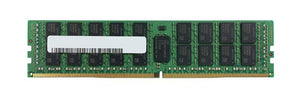
Memory modules are handled frequently, have exposed contacts, and are among the most sensitive things in a server.
Expansion cards — network adapters, HBAs, controllers — particularly around the connector edge.
Processors, where the contact area is exposed during fitting.
Printheads. Worth calling out separately because it is less well known: thermal printheads are static-sensitive, and touching the print line with bare fingers can kill heating elements instantly. Our printhead guide covers this alongside the other things that shorten head life.
Drives are somewhat less sensitive than bare boards but still warrant care, particularly on the connector.
The basic discipline
Five habits that cover most of the risk and cost almost nothing.
Handle by the edges. Not the contacts, not the components on the board. This alone prevents most incidents.
Ground yourself before touching anything. A wrist strap connected to a proper ground is the reliable method. Where one is not available, touching an unpainted metal part of a grounded chassis before handling the component is considerably better than nothing.
Keep components in antistatic packaging until the moment of fitting, and put the removed component into that packaging immediately. The bag the replacement arrived in is exactly the right place for the part coming out.
Work on a hard surface rather than carpet, and avoid synthetic clothing where practical — both generate charge readily.
Dry conditions increase risk. Static builds far more readily in low humidity, which is worth knowing in winter and in air-conditioned rooms.
Where practice slips
Three situations where it usually goes wrong, and none involve carelessness exactly.
Urgency. A production system is down, the replacement drive is in hand, and the wrist strap is somewhere else. That is the moment the discipline matters most and is most likely to be skipped.
Familiarity. Someone who has fitted hundreds of modules without incident concludes the precautions are theatre. Latent damage is exactly the failure mode that would not have taught them otherwise.
Unprepared spaces. Work done on a desk, on a rack floor, or in a vehicle, because that is where the equipment is. Our local access guide makes the same point about keeping the kit together — a wrist strap belongs in the same place as the adapters.
Packaging for returns and transport
Where damage is caused after the work rather than during it.
A component returned in an ordinary padded envelope, or wrapped in bubble wrap alone, is not protected against static. Bubble wrap generates charge readily.
Use antistatic packaging — again, the bag the replacement arrived in is ideal — inside a box that prevents movement. Our claims guide covers packing returns so that damage in transit does not turn a warranty claim into a dispute.
The same applies to components held as spares. A drive or memory module sitting loose in a drawer is exposed to both static and physical damage. Keep spares in their packaging, labelled, so they are usable when needed — our spares guide covers building a holding that works.
What to have available
The kit is small and inexpensive: a wrist strap with a way to ground it, antistatic bags kept from incoming shipments rather than discarded, and a hard working surface.
Keep it wherever hardware work actually happens rather than in a store cupboard, because the constraint is availability at the moment of urgency rather than cost.
And tell people why. "Handle it by the edges and ground yourself" is followed more reliably by someone who knows that the damage they are preventing is invisible and shows up months later.
Common questions
If nothing broke, was there really a risk?
Possibly. The common outcome of a discharge is latent damage — the component is weakened rather than destroyed, works, passes testing, and fails prematurely later. That is exactly the failure mode that would not teach you otherwise.
Which components are most sensitive?
Memory modules, expansion cards and processors, because of exposed contacts. Thermal printheads too, which is less well known — touching the print line with bare fingers can kill heating elements instantly.
What if I have no wrist strap?
Touching an unpainted metal part of a grounded chassis before handling the component is considerably better than nothing, and handling by the edges rather than the contacts prevents most incidents on its own. A wrist strap remains the reliable method.
Is bubble wrap adequate for returning a component?
No — it generates charge readily and offers no static protection. Use antistatic packaging, ideally the bag the replacement arrived in, inside a box that prevents movement.
When does practice usually slip?
Under urgency, when a system is down and the strap is elsewhere; through familiarity, since latent damage never taught anyone otherwise; and in unprepared spaces. Keep the kit where hardware work actually happens.
Keep the antistatic bags that components arrive in — they are exactly what the part coming out should go into.