HPE ProLiant DL380 Gen9 Specs, Bays, Memory and Buying Guide

The HPE ProLiant DL380 Gen9 is a 2U rack server and one of the most widely deployed machines of its generation. If you are buying one used, the configuration matters far more than the model name, and this covers what to check.
What is the HPE DL380 Gen9?
A dual-socket 2U rack server using socket LGA 2011-3, supporting Intel Xeon E5-2600 v3 and v4 processors, with DDR4 memory across 24 DIMM slots and iLO 4 remote management.
Its appeal is flexibility. The same model name covers chassis with very different drive capabilities, which is exactly why the model alone does not tell you what you are getting.
DL380 Gen9 drive bay configurations explained
This is the most important specification and the one most often missed.
The DL380 Gen9 shipped in several front configurations, including 8 small form factor bays, 24 small form factor bays, and 12 large form factor bays, with optional rear bays on some builds.
Three consequences.
Bay count is fixed by the backplane fitted, not by the model. An 8-bay chassis does not become a 24-bay chassis by adding drives — it needs different backplane hardware and cabling, which is chassis-specific. Our backplanes guide covers why.
Small and large form factor chassis are different machines. A 2.5 inch chassis cannot take 3.5 inch drives at all.
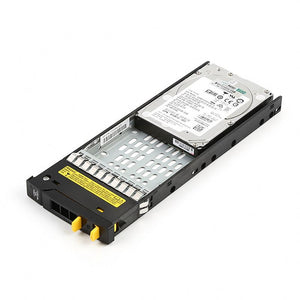
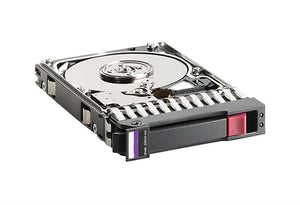
Empty bays need carriers. A machine with four drives in an eight-bay chassis has four carriers, and Smart Carrier generation must match. This is the most common omission in a DL380 order.
So the first question with any DL380 Gen9 is not "which model" but how many bays, what size, and are carriers included.
What processors does the DL380 Gen9 support?
Intel Xeon E5-2600 v3 and v4 families, both using LGA 2011-3.
The trap: v4 support requires a firmware level that not every unit has. A v4 processor fits physically in a board shipped for v3 and the machine will not post without firmware support. Update firmware before installing, not after — because if it will not post, you cannot then apply the update. Our E5-2680 v4 guide covers this in detail.
Two further points for a second processor: the heatsink is a separate part, and many configurations require additional fans when the second socket is populated. Our processor matching guide covers everything that changes.
DL380 Gen9 memory: how many slots and what type?
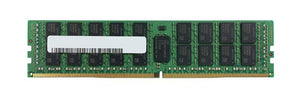
24 DIMM slots across two processors, taking DDR4 registered ECC memory.
Three rules that decide what you can actually install.
Memory follows the processor. Twelve slots belong to each socket, so a single-processor machine can only populate twelve.
Channels must be populated evenly. Uneven population reports full capacity while delivering less bandwidth, with nothing flagging it — our memory guide covers the population order.
Speed drops as slots fill. A fully populated machine can run its memory slower than a half-populated one, so more capacity can mean less bandwidth.
Desktop memory will not work. This platform requires registered ECC modules — our module types guide covers the difference.
Which RAID controller does the DL380 Gen9 use?
Commonly a Smart Array P440ar, which is a modular controller fitting a dedicated position on the system board rather than a PCIe slot.
Two things to check on any used unit.
Is the cache module and capacitor pack present? They are separate parts. Without working cache backup the controller runs write-through, and write performance collapses with no error reported — the machine is simply slow. Our P440ar guide covers this, and it is the single most useful check on a DL380 that feels slow.
Does it support the drives you intend? Smart Array controllers validate drive firmware, so HPE-coded drives are the safe choice — our HPE SSD guide covers what happens with non-coded drives.
What is missing from a used DL380 Gen9?
The parts that stop a deployment, in order of how often they are absent.
Rails. They stay in the rack when equipment is removed, so used servers frequently arrive without them — and they are chassis-specific.
Drive carriers for empty bays.
Risers, without which the machine cannot take expansion cards at all.
The cache module and capacitor pack for the controller.
Bezel and fan blanks, which matter for airflow rather than appearance.
None are expensive. All of them delay a build. Ask before ordering rather than after — our build versus buy guide covers the wider list.
Is the DL380 Gen9 still worth buying?
An honest answer, since this is a generation with real years behind it.
Reasons it still makes sense: matching an existing fleet where consistency has value, replacing a failed unit, lab and test environments, and workloads that are fixed and well served. Parts remain widely available, which is a genuine advantage of a platform this common.
Reasons to look newer: performance per watt is well below current parts, so running cost is higher for the same work — our TCO guide covers counting that. And per-core software licensing can make an older generation expensive relative to what it delivers.
Where the machine is doing a defined job and the budget is better spent elsewhere, it remains a sensible purchase. Our decision guide covers making that call deliberately.
Frequently asked questions
How many drives does an HPE DL380 Gen9 hold?
It depends on the chassis, not the model. The DL380 Gen9 shipped in 8-bay and 24-bay small form factor versions and a 12-bay large form factor version, with optional rear bays on some builds. Bay count is fixed by the backplane fitted and cannot be increased by adding drives alone.
Does the DL380 Gen9 support Xeon E5 v4 processors?
Yes, but only at a firmware level that supports the v4 family. A v4 processor fits physically in a board shipped for v3 and the machine will not post without that support. Update firmware before installing rather than after.
How many memory slots does the DL380 Gen9 have?
24 DIMM slots taking DDR4 registered ECC memory, split twelve per processor. A single-processor machine can only populate twelve, and populating channels unevenly delivers less bandwidth than the reported capacity suggests.
Why is my DL380 Gen9 slow with no errors showing?
Check the Smart Array cache capacitor pack. Without working cache backup the controller runs write-through, which collapses write performance while nothing appears broken — no failed drive, no array error. Check this before buying faster drives.
Do used DL380 Gen9 servers come with rails and caddies?
Frequently not. Rails stay in the rack when equipment is removed, and empty bays rarely come with carriers. Risers, the cache module and fan blanks are also commonly absent. Ask before ordering rather than after.
Can I use non-HPE drives in a DL380 Gen9?
Smart Array controllers validate drive firmware, so a non-coded drive may be flagged in iLO, may not report predictive failure warnings, or may be refused during a rebuild. The carrier must also match your Smart Carrier generation regardless of the drive itself.
Tell us your bay configuration and what the machine will run, and we will confirm drives, carriers, memory and rails together before anything ships.