Printer Duty Cycle: Sizing a Label Printer to Real Volume

The most expensive mistake in label printing is not buying a refurbished machine instead of a new one. It is buying a desktop-class printer for an industrial duty cycle, then replacing it twice in the time an industrial unit would have run without complaint.
This guide covers how to work out your real print volume, what duty cycle ratings do and do not tell you, the components that actually wear, and why the cheaper printer frequently costs more over three years.
Measure volume properly
Most people estimate labels per day and stop there. Two numbers matter more.
Linear length, not label count. Printhead life is rated in inches or metres of media passed, not in labels. Ten thousand small labels and two thousand large ones can be the same wear. Multiply label length by volume to get the figure that predicts consumable cost.
Peak rate, not average. An operation printing 4,000 labels a day sounds moderate until you learn that 3,000 of them go out in the two hours before the carrier collection. The printer has to survive the peak, and a machine sized on the daily average will be the bottleneck every afternoon.
Take both numbers from actual data if you can. Most printers report a lifetime length counter, and comparing it against the install date gives you a real rate rather than an estimate. Our guide on managing label consumables covers using consumption to set reorder points from the same data.
What duty cycle ratings mean
Manufacturers publish a recommended or maximum duty cycle, usually as labels or linear length per day or per month. Read it as a design intent rather than a hard limit.
Exceeding it does not stop the printer. It shortens the intervals between printhead replacements, platen replacements and service, and increases the chance of a failure at a bad moment.
Sitting well under it does not mean you over-bought. Headroom is what lets a machine handle a seasonal spike without becoming the constraint.
Compare like with like. A figure quoted per month against one quoted per day, or labels against linear length, will mislead you. Convert to one unit before comparing models.
What actually wears out
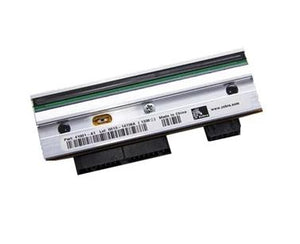
The printhead is the main consumable and is rated in linear length. Everything that shortens it — excessive darkness, abrasive media, a ribbon narrower than the label, skipped cleaning — is under your control. Our guides on print darkness and speed and printhead failure cover the causes.
The platen roller wears and accumulates adhesive, and a worn platen causes print quality problems that look like printhead faults.
The cutter, if fitted, is often the first thing to fail in high-volume receipt and label work, and cutters carry their own separate cycle rating. In a POS or shipping environment the cutter rating can be the number that decides the model. See the POS receipt printer buying guide.
Drive and media handling components wear on industrial machines under continuous load, which is precisely what the heavier construction is for.
Desktop, industrial, or mobile
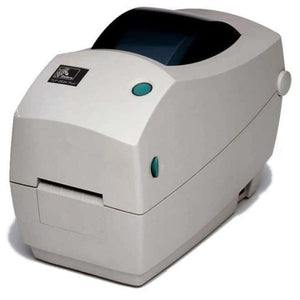
Desktop printers suit low to moderate volume in clean environments: retail back office, pharmacy, small dispatch, front-of-house. Light construction, smaller media rolls, lower duty rating, lower price.
Industrial printers are built for continuous operation in poor conditions. Metal construction, large media capacity, higher duty ratings, better serviceability, and options like cutters, peelers and applicators. They cost more and they last in places desktops do not.
Mobile printers trade volume for portability and are sized by battery and shift rather than by daily throughput.
Our guide on industrial versus desktop label printers works through the dividing line in detail.
Media capacity is an operational cost
A number that rarely appears in the comparison and should. A desktop printer taking a small roll may need changing several times a shift at high volume. Each change is minutes of operator time plus a pause in the line.
An industrial printer taking a large roll may run a full shift untouched. At volume, that difference can outweigh the purchase price gap inside a year, and it removes a recurring interruption from the operator's day.
The arithmetic that decides it
Compare over three years rather than at purchase:
- Purchase price of each option
- Expected printhead replacements over the period, from your linear length against the rated life
- Platen and cutter replacements where applicable
- Operator time spent on media changes, from roll capacity against consumption
- Expected downtime, and what an hour of it costs in your operation
For a low-volume station the desktop usually wins clearly. For anything running continuously, the industrial machine frequently wins on total cost even before downtime is counted. Our guide on new versus refurbished total cost of ownership covers running this calculation, and the same method applies across printer classes.
Where refurbished fits. A refurbished industrial printer is often cheaper than a new desktop one and better suited to the work. The question to ask is remaining printhead life, because that is the real value in a used thermal printer. Our guide on refurbished grading terms covers what the condition language means.
Plan for the spare
If a stopped printer stops the line, the sizing question has a second part: what happens when it fails. A spare printhead on the shelf, or a spare printer at a multi-station site, converts a day of disruption into a few minutes.
Standardising models across sites makes that spare cover more machines. Our guides on multi-site standardisation and printer firmware and fleet configuration cover keeping a standardised fleet actually uniform.
Sourcing
We supply desktop, industrial and mobile label printers, POS printers, printheads, platens and matched media from Zebra, SATO, Honeywell, Bixolon, Epson and others, new and refurbished. Tell us your daily volume, your peak hour and your label size and we will size the printer against the work rather than the budget line. Request a bulk quote or email sarah.jane@techsellerusa.com.
Common questions
What does printer duty cycle actually mean?
It is the manufacturer's recommended volume, usually expressed as labels or linear length per day or per month, and it describes design intent rather than a hard limit. Exceeding it does not stop the printer; it shortens the intervals between printhead and platen replacements and raises the chance of failure at a bad moment. Convert competing figures to one unit before comparing, because per-day and per-month quotes are easy to misread.
Should I size a printer on labels per day?
Not on its own. Use linear length, because printhead life is rated in inches or metres of media passed rather than in labels, so ten thousand small labels and two thousand large ones can represent the same wear. And size against your peak hour rather than the daily average, since an operation sending most of its volume out before a carrier collection needs a printer that survives that burst.
Is an industrial printer worth the extra cost?
At volume, usually yes, and often before downtime is even counted. The heavier construction lasts under continuous load, the duty rating is higher, and the larger media roll removes several changes per shift, each costing operator time and a pause in the line. For a low-volume station in a clean environment the desktop wins clearly. The mistake is buying desktop for industrial work, not the other way round.
What wears out first on a label printer?
The printhead is the main consumable and is rated in linear length. The platen roller wears and collects adhesive, causing quality problems that get mistaken for printhead faults. Where a cutter is fitted it is often the first component to fail in high-volume work, and it carries its own separate cycle rating, which in POS and shipping environments can be the number that decides the model.
How do I find my actual print volume?
Most printers keep a lifetime length counter, usually visible on a configuration printout or through the management interface. Compare it against the install date and you have a measured rate rather than an estimate, which is far more reliable than asking people how many labels they think they print. That same figure also sets realistic consumable reorder points.
Is a refurbished industrial printer better than a new desktop one?
For industrial duty work, frequently yes. A refurbished industrial machine often costs less than a new desktop model while being built for the work, and construction quality does not degrade the way a consumable does. The question to ask is remaining printhead life, since that is where the real value sits in a used thermal printer, and whether the head has been replaced.
Tell us your daily volume, peak hour and label size, and we will size the printer against the work rather than the budget line.