Toshiba B-EX4T2 vs B-EX4T1: Flat Head or Near Edge Printer?

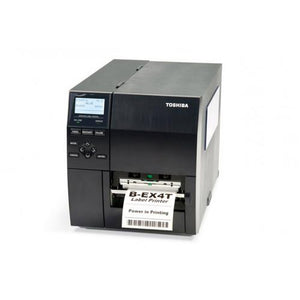
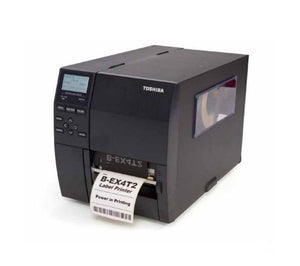
Toshiba B-EX4T2 vs B-EX4T1 is the first question most buyers ask about these two 4 inch industrial label printers, because they look almost identical and share the same footprint. The difference is inside: the B-EX4T2 uses a flat printhead and the B-EX4T1 uses a near edge printhead, and that one choice decides which ribbons you buy, which media thicknesses you can run, and whether you can print at 600 dpi.
This guide sets out the verified differences, explains when the flat head B-EX4T2 is the better pick, and covers the BEX4T2GS12M01 in our listing. If you only need the numbers, go straight to the specifications table or the comparison table.
In this guide
- Products in our listing
- Toshiba B-EX4T2 specs: BEX4T2GS12M01 in our listing
- Toshiba B-EX4T2 vs B-EX4T1: the verified differences
- Flat head vs near edge printer: what it means day to day
- When the B-EX4T2 is the better choice
- What the BEX4T2GS12M01 in our listing suits
- Who buys a 4 inch industrial printer like the B-EX4T2
- Setup and integration
- Planning a fleet: mixing B-EX4T2 and B-EX4T1 units
- Refurbished B-EX4T2 checks
- Common questions
Products in our listing
The B-EX4T2 we list is below, and the card links to the full product page.

BEX4T2GS12M01 is listed as refurbished and carries the 30-Day Tech Seller USA warranty; a manufacturer warranty is not guaranteed. Browse the full Toshiba printer range.
Need one B-EX4T2 or several?
Send the part number and quantity and we will confirm the configuration and quote.
Toshiba B-EX4T2 specs: BEX4T2GS12M01 in our listing
The table shows what our product data records for this unit. Where a value is missing it is marked Not listed.
| Feature | BEX4T2GS12M01 |
|---|---|
| Print method | Thermal transfer / direct thermal |
| Print resolution | 203 dpi |
| Max print width | 4.09 in (104 mm) |
| Max media width | Up to 4.49 in (114 mm) |
| Print speed | Up to 12 ips (304 mm/sec) |
| Interface | USB 2.0, Ethernet |
| Ribbon length (as listed) | 450 m and 600 m |
| Printhead type | Not listed |
| Listed weight | 37.5 lbs |
| Condition | Refurbished |
| Warranty | 30-Day Tech Seller USA |
Toshiba B-EX4T2 vs B-EX4T1: the verified differences
Both models share Toshiba's B-EX chassis. Toshiba lists the same 104 mm (4.09 in) print width, the same 278 x 460 x 310 mm dimensions, the same 17 kg weight, thermal transfer and direct thermal printing, Ethernet and USB 2.0 as standard, and TPCL and BCI as the programming languages. The differences come from the printhead. The figures below are from Toshiba product pages and data sheets.
| Feature (Toshiba data) | B-EX4T2 | B-EX4T1 |
|---|---|---|
| Printhead type | Flat | Near edge |
| Resolutions offered | 203, 300 and 600 dpi | 203 and 305 dpi |
| Maximum speed | Up to 12 ips | Up to 14 ips |
| Media width | 22 to 114 mm | 27 to 120 mm |
| Media thickness | 0.08 to 0.17 mm | 0.13 to 0.263 mm |
| Standard ribbon length | 600 m | 600 m |
| Ribbon width | 41 to 112 mm | 41 to 112 mm |
| In our listing | BEX4T2GS12M01 | BEX4T1TS12DM01, BEX4T1GS12DM01 |
Read the table as three practical differences. First, resolution: only the B-EX4T2 is offered with a 600 dpi head, for very small labels and fine graphics. Second, speed: the near edge B-EX4T1 is rated a little faster at the top end. Third, media: the B-EX4T2 accepts thinner stock and slightly narrower labels, while the B-EX4T1 accepts thicker stock and slightly wider rolls.
Flat head vs near edge printer: what it means day to day
On a flat head printer the heating elements sit on the flat face of the printhead, and the ribbon and label travel past together before they separate. On a near edge printer the elements sit close to the edge of the head, so the ribbon peels away from the label right after printing. Toshiba states that the near edge position on the B-EX4T1 improves print quality because the media passes straight through.
For a buyer, the head type matters most in three places:
- Ribbon: flat head and near edge ribbons are sold as separate products. A site that already runs flat head Toshiba ribbon can keep that stock on a B-EX4T2; a near edge B-EX4T1 needs near edge ribbon. Our label media and ribbon selection guide covers ribbon chemistry.
- Media range: Toshiba lists a thinner minimum media thickness on the B-EX4T2 and a thicker maximum on the B-EX4T1. If you print heavy tags or thick synthetic stock, check the B-EX4T1 range first. For standard paper and thin film labels, the B-EX4T2 range fits.
- Print quality problems: the wrong ribbon for the head type is a common cause of ribbon wrinkle, smearing and patchy transfer.
Toshiba lists the same media types for both models: vellum paper and labels, matt coated paper, glossy coated paper, synthetic film, PET film and polyimide. Both print by thermal transfer or direct thermal, and our direct thermal vs thermal transfer guide explains which method suits which label.
When the B-EX4T2 is the better choice
Pick the B-EX4T2 flat head printer when one of these applies:
- You already run flat head ribbon. Toshiba markets the B-EX4T2 as able to replace printers in place with no need for new ribbons, media or driver. Toshiba does not name the earlier models on that page, so tell us what you are replacing and we will confirm the match.
- You need 600 dpi. Electronics, pharmaceutical, jewelry and small component labels with tiny text or small 2D codes may need it. Toshiba lists a maximum print length of 498 mm at 600 dpi. The unit in our listing is 203 dpi, so ask us if you need a higher resolution head.
- You print standard paper or thin film labels and do not need the extra 2 ips at the top end.
Pick the near edge B-EX4T1 when your site already stocks near edge ribbon, when you print on thicker media, or when top speed on long runs matters most. Our 203 vs 300 vs 600 dpi guide helps with the resolution decision, and barcode verification covers grading if customers check your labels.
What the BEX4T2GS12M01 in our listing suits
Our BEX4T2GS12M01 records a 203 dpi head, up to 12 ips, a 4.09 in print width and media up to 4.49 in wide. That is the standard setup for 4 x 6 shipping labels, carton labels, pallet labels and warehouse location labels, where barcodes are large and speed matters more than fine detail. Toshiba data sheet model codes on the B-EX4T family use GS for 203 dpi heads, which matches this part number.
For shipping work, our shipping label compliance guide covers label layout. If your daily volume is modest and the printer will sit on a desk, compare it with a desktop model first: our industrial vs desktop guide explains the trade off, and the Toshiba B-FV4D guide covers the desktop option in the same brand.
Who buys a 4 inch industrial printer like the B-EX4T2
The Toshiba B-EX4T2 label printer is built for steady, all day printing, not occasional use. Typical buyers are shipping and receiving teams printing carton and pallet labels in batches, manufacturing sites printing product and work in progress labels, and warehouses printing location and rack labels. In each case the printer runs large label rolls and long ribbons, so operators spend less time reloading than they would on a desktop model. A single B-EX4T2 suits one busy station, while larger sites buy several to cover each line or dock door.
Setup and integration
Our listing records USB 2.0 and Ethernet, which matches the standard interfaces Toshiba lists for the B-EX4T2. Ethernet suits a shared printer on a line or in a shipping area; USB suits a printer tied to one workstation. Our printer connectivity guide covers the options.
Toshiba lists TPCL and BCI as the programming languages. If you print from label design software or through a Windows driver, that is usually all you need. If a host system sends raw code written for another brand of printer, check compatibility with us first. Our printer command languages guide explains why this matters. For a mixed fleet, the Zebra ZT411 guide covers another common 4 inch industrial platform.
Planning a fleet: mixing B-EX4T2 and B-EX4T1 units
Many sites end up with both models, either because units were bought at different times or because one line needs a feature the other model does not have. A mixed fleet works, but it needs a little planning.
- Keep two ribbon shelves. Label each ribbon box clearly as flat head or near edge, and keep the stock next to the printers that use it. Loading the wrong ribbon is an easy mistake on a mixed floor.
- Keep label formats portable. Both models use TPCL and print at 104 mm width, so a format designed at one resolution can usually be reused. If you mix 203 dpi and 300 dpi heads, check that barcodes and small text still scale correctly on each printer.
- Standardize settings. Record darkness, speed and sensor settings for each label type, so a replacement unit can be set up in minutes.
- Plan spares by head type. Printheads and platen rollers wear, and the parts differ between flat head and near edge models. Hold spares for the model you run most.
If you are starting from scratch, choose one head type for the whole site. It halves your ribbon range, simplifies training and makes any unit a drop in spare for any other. Tell us how many lines you run and we can quote matching units in one order.
Refurbished B-EX4T2 checks
Before a refurbished B-EX4T2 goes on your line, run a test label on your own media and ribbon and check:
- Printhead: no white lines or voids. See our printhead failure guide.
- Ribbon path: the ribbon runs flat with no wrinkle across the width you use.
- Sensors: gap or black mark sensing calibrates on your stock.
- Network: the printer takes an IP address and prints from your system.
Our refurbished grading guide explains condition terms, and the maintenance guide covers routine cleaning. If you see faded or skipped labels after setup, our label printer troubleshooting guide walks through the usual causes. The unit carries the 30-Day Tech Seller USA warranty.
Within Toshiba, our listing also includes the BA410T 4 inch industrial printer and the B-EX6T1 for 6 inch labels.
Comparing B-EX4T2 and B-EX4T1 for your site?
Tell us your ribbon, media and label size and we will confirm which model fits.
Common questions
Toshiba B-EX4T2 vs B-EX4T1: what is the main difference?
The printhead. The B-EX4T2 has a flat printhead and the B-EX4T1 has a near edge printhead. That changes the ribbon you buy, the media thickness range, the top speed and the resolutions offered.
Can I use B-EX4T1 ribbon in a B-EX4T2?
Match the ribbon to the head type. Flat head and near edge ribbons are sold as separate products, so a flat head B-EX4T2 needs ribbon specified for flat head printers.
Is the B-EX4T2 available in 600 dpi?
Toshiba lists 203, 300 and 600 dpi for the B-EX4T2. The unit in our listing, BEX4T2GS12M01, is 203 dpi.
How fast is the Toshiba B-EX4T2?
Toshiba lists up to 12 ips, and our BEX4T2GS12M01 listing records up to 12 ips (304 mm/sec). The B-EX4T1 is listed at up to 14 ips.
What media width does the B-EX4T2 take?
Our listing records media up to 4.49 in (114 mm) and a 4.09 in (104 mm) print width. Toshiba lists a media width range of 22 to 114 mm.
Does the BEX4T2GS12M01 come with a warranty?
It carries the 30-Day Tech Seller USA warranty. A manufacturer warranty is not guaranteed.
Ready to order a Toshiba B-EX4T2?
Request a quote for one printer or several and we will confirm the configuration.