Toshiba B-FV4D Desktop Label Printer: Specs and Buying Guide

The single most common ordering mistake on this printer is one letter. The Toshiba B-FV4 series splits into a D and a T, and they are not interchangeable: one of them cannot use a ribbon at all.
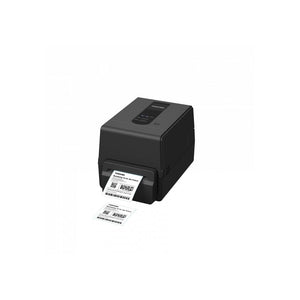
The Toshiba B-FV4D is the direct thermal version. It prints a 4-inch wide label at 203 dpi, weighs 3.8 lbs, and is supplied here as part B-FV4D-GH14-QM-R in refurbished, function-tested condition. If you need labels that survive months of heat, light or handling, you want the thermal transfer B-FV4T instead, and we will tell you so rather than sell you this one.
D or T: what the letter actually changes
Direct thermal printing uses heat to darken a chemically coated label. There is no ribbon, nothing to thread and nothing extra to buy. The mechanism is simpler, so the printer is cheaper and roll changes take seconds.
Thermal transfer uses a ribbon: heat melts pigment from the ribbon onto the label. That needs a ribbon path, a supply spindle and a take-up spindle inside the printer, which is why a transfer-capable unit costs more and is slightly deeper.
The output is what differs. Direct thermal fades. Leave a direct thermal label in a warm room, in sunlight or against a warm surface and it goes grey and then blank, over weeks to months depending on conditions. Thermal transfer output on the right label material lasts years.
So the question is not which is better. It is how long your label has to be readable:
Direct thermal is right for shipping labels, pick and pack labels, order labels, date labels, and anything consumed within days or weeks. This is the majority of e-commerce and warehouse outbound labelling.
Thermal transfer is required for asset tags, shelf and location labels, chemical and compliance labels, anything stored long term, and anything going outdoors.
Our guide on direct thermal versus thermal transfer printing covers the decision in detail, and label media and ribbon selection covers choosing stock once you have decided.
Toshiba B-FV4D specifications
| Part Number | B-FV4D-GH14-QM-R |
| Manufacturer | Toshiba |
| Product Family | B-FV4D |
| Product Type | Desktop Label Printer |
| Print Method | Direct Thermal |
| Print Resolution | 203 dpi |
| Max Print Width | 4 inches |
| Weight | 3.8 lbs |
| Condition | Refurbished, function-tested |
| Warranty | 30-day Tech Seller USA warranty |
B-FV4 units were built with different interface combinations, and the full part number identifies which. Tell us whether you need USB, Ethernet, serial or wireless and we will confirm what is fitted on the unit being quoted rather than assuming from the model name.
3.8 lbs: what that weight tells you
Weight is the most honest specification on a thermal printer, because it is a direct proxy for how much metal is in the frame and how long the printer holds calibration.
At 3.8 lbs this is a genuine desktop printer. It sits on a packing bench or a counter, it is easy to move, and it costs a fraction of an industrial unit. It will print a few hundred to a couple of thousand labels a day happily.
What it is not built for is continuous production duty. A printer running tens of thousands of labels a day needs a metal chassis that holds the printhead in exact alignment with the platen through constant thermal cycling, and that is a 20 to 50 lb machine. Put a desktop printer on that duty and you replace it annually while blaming the brand.
For reference within our range: this unit at 3.8 lbs and the Citizen CL-S521II at 7.9 lbs are both desktop class; the Honeywell PD45S at 20.4 lbs is compact industrial; the Datamax H-Class at 40 lbs is full industrial. Our guide on printer duty cycle and print volume sizing explains how to size against your real daily count.

SKU: B-FV4D-GH14-QM-R | Refurbished & function-tested | Direct thermal, 203 dpi | 30-day warranty
View Details & Request a Quote →4 inches at 203 dpi: the standard combination, and why
Four inches wide at 203 dpi is the most common specification in label printing, and that is not an accident. A 4 x 6 inch shipping label is the standard for almost every carrier, and 203 dpi prints a clean, scannable linear barcode at the sizes those labels use.
Going higher costs you twice. A 300 dpi printhead is more expensive to replace, and it prints more slowly at the same speed setting because more heating elements fire per inch. You should pay that only when you need it: small DataMatrix codes, regulatory text at small point sizes, or fine graphics.
Going narrower is a false economy if any of your labels are 4 inches. A 2-inch printer cannot print a shipping label, and buying one because most of your labels are small means buying a second printer later.
The practical check is to design against the print width rather than the media width. Labels are always slightly wider than the printable area because of liner margins, and artwork drawn to the full media width gets clipped. See barcode label design best practice.
Where the B-FV4D fits
E-commerce packing benches. Carrier shipping labels, one per parcel, printed as orders are picked. This is the printer's clearest use.
Warehouse pick and pack. Pick labels, tote labels and despatch documentation.
Retail back of house and stockrooms. Goods-in identification and internal tracking.
Kitchens and food prep. Date and allergen labels consumed within days, where direct thermal's short life is irrelevant.
It is the wrong printer for asset tagging, outdoor labelling or anything that must stay readable for years, which needs thermal transfer. It is also wrong for continuous production duty, where an industrial unit is cheaper over its life.
What wears, and what to ask on a refurbished unit
Desktop thermal printers refurbish well because there is little to go wrong mechanically. Two components carry essentially all the wear.
The printhead. This is a consumable rated in length of media printed, not a permanent part. It is also the most expensive single component. Ask about its condition and whether it has been replaced. A head that is starting to fail shows as a thin white line running the length of every label, which is burnt-out elements and not a cleaning problem.
The platen roller. The rubber roller that drives the media. A worn or flat-spotted platen causes tracking drift, inconsistent darkness and feed problems that are routinely misdiagnosed as printhead faults and fixed by replacing the wrong part.
Then confirm what is in the box. Power supply, power cable, interface cable and media spindle are frequently missing from refurbished listings across this market, and a printer without its power supply is not a working printer.
We function-test and print-test every unit and will state plainly what is fitted and included. Our guides on refurbished grading terms and printhead failure diagnosis and replacement cover both.
Making the printhead last
Most thermal printheads die early rather than wearing out, and the causes are consistent and avoidable.
Abrasive or low-grade label stock is the biggest one; cheap media is the most expensive saving in this category. Darkness set higher than necessary is the second, because every extra degree of heat shortens element life. And skipped cleaning is the third: a head cleaned at every media change lasts substantially longer than one that is not, and cleaning takes under a minute with a swab.
If the printer is production critical, keep a spare printhead on the shelf. It is small, cheap relative to downtime, and easily stocked. See thermal printer maintenance and managing label consumables and spares.
Ordering
We supply the B-FV4D-GH14-QM-R refurbished and function-tested with a 30-day warranty, singly or in quantity. Tell us your label size, daily volume, how long the labels need to stay readable, and which interface you need, and we will confirm the configuration and whether direct thermal is the right choice before you order. Browse our Toshiba range or the full printers and scanners catalogue.
Common questions
What is the difference between the Toshiba B-FV4D and B-FV4T?
The D is direct thermal only and cannot use a ribbon; the T is thermal transfer capable. Direct thermal output fades over weeks to months with heat and light, so choose the D for shipping and short-life labels and the T for asset tags, compliance labels and anything stored long term.
Does the B-FV4D need a ribbon?
No, and it cannot use one. It is direct thermal, so heat darkens coated label stock directly and the only consumable is the labels themselves. That makes roll changes fast and running costs lower, at the cost of label life.
Is 203 dpi enough for shipping labels?
Yes. 203 dpi prints clean, scannable linear barcodes at the sizes carrier labels use, prints faster and consumes printhead life more slowly than 300 dpi. Step up only for small 2D codes, fine regulatory text or detailed graphics.
How many labels a day can a desktop printer handle?
A few hundred to a couple of thousand comfortably. Beyond that, a metal-framed industrial printer holds calibration through constant thermal cycling where a desktop chassis flexes, and works out cheaper over its life despite costing several times as much.
What causes a thin white line down every label?
Burnt-out printhead elements, which means the head needs replacing rather than cleaning. Faded output across the whole label is different and usually a darkness, pressure or media mismatch problem, so check that before buying a head.
Send us your label size, daily volume and how long the labels must stay readable, and we will confirm whether direct thermal is right before quoting.