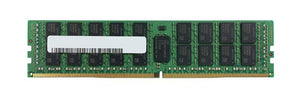
M393A2G40DB0-CPB Samsung 16GB DDR4-2133 RDIMM: Fit Guide

The M393A2G40DB0-CPB is a Samsung 16GB DDR4 registered ECC module, and it is one of the most common memory parts in the E5-2600 v3 and v4 server generation. This covers what it is, where it fits, and the two mistakes people make when adding it.
What is the Samsung M393A2G40DB0-CPB?
A 16GB DDR4 registered ECC DIMM. The Samsung part number encodes the specification: M393 identifies a registered module, 2G40 the 16GB dual-rank x4 organisation, and the CPB suffix the DDR4-2133 speed grade (PC4-17000).
So this is a 16GB 2Rx4 PC4-2133 RDIMM. Confirm the label on your unit matches, since Samsung produced this capacity in several speed grades under similar numbers — our part numbers guide covers reading vendor codes, and our memory identification guide covers the label fields.
Which servers use the M393A2G40DB0-CPB?
Any DDR4 server accepting registered ECC modules at 2133 or above. It shipped as OEM memory in the HPE Gen9, Dell 13th generation and Lenovo M5 platforms, frequently relabelled with the server vendor’s part number.
That relabelling matters: an HPE or Dell 16GB PC4-2133 RDIMM is often exactly this Samsung module with a different sticker. Our OEM guide covers when the vendor label matters and when it does not.
Our DL380 Gen9 guide and R730 guide cover the platforms it is most often found in.
Can I mix it with faster DDR4 modules?
Yes, and everything will run at 2133.
A memory channel runs at the speed of its slowest module. Adding a 2133 module to a machine running 2400 memory drops every channel it shares to 2133. That is not a fault; it is how DDR4 works. But it is why matching speed grades across all slots is the sensible rule when adding memory.
The reverse is also true: a faster module in a machine whose processor supports only 2133 runs at 2133 regardless. Our DDR4 guide covers speed grades and what sets the ceiling.
The two mistakes people make
Buying UDIMM or LRDIMM by accident. This is an RDIMM. RDIMM and UDIMM cannot be mixed; RDIMM and LRDIMM cannot be mixed. A machine running RDIMM must have RDIMM throughout. Our module types guide covers this.
Populating channels unevenly. Adding one or two modules to a machine without following the population order leaves channels unbalanced. The machine reports full capacity and delivers less bandwidth, with nothing flagging it. Follow the platform’s population table — our memory guide covers the order.
Is 16GB the right module size?
Depends on the target total and slot count.
With twelve slots per processor and 16GB modules, a single-socket machine reaches 192GB fully populated; dual-socket, 384GB. That covers most virtualisation hosts of this generation.
Where you need more, 32GB modules leave slots free for later expansion and reduce the speed penalty from full population. Our 32GB DDR4 RDIMM guide covers the larger sibling, and our host sizing guide covers deciding the target.
What to check before buying
Four things.
The module type in your machine now — RDIMM, confirmed from a label.
Speed grade of existing modules, and whether you are willing to run everything at 2133.
Population order for your platform and the number of modules you are adding.
Rank, since some platforms limit ranks per channel. This is a dual-rank module. Our ECC guide covers the wider set of rules.
Frequently asked questions
What speed is the M393A2G40DB0-CPB?
DDR4-2133, PC4-17000. The CPB suffix identifies the speed grade. Samsung produced 16GB RDIMMs in other speed grades under similar part numbers, so confirm the suffix on the label.
Is the M393A2G40DB0-CPB RDIMM or UDIMM?
RDIMM, registered ECC. It cannot be mixed with UDIMM or LRDIMM. A machine running RDIMM must have RDIMM throughout.
Can I mix this with 2400 memory?
Yes, and every channel it shares will run at 2133. A channel runs at the speed of its slowest module. Matching speed grades across all slots is the sensible rule.
Is this the same as HPE or Dell 16GB memory?
Frequently. Server vendors relabel Samsung modules with their own part numbers. An HPE or Dell 16GB PC4-2133 RDIMM is often this exact module with a different sticker.
Will it work in a desktop?
No. Desktop boards take unbuffered memory. A registered module will not work in a desktop, and desktop memory will not work in a server that requires RDIMM.
Why does my server show less bandwidth after adding memory?
Uneven channel population. The machine reports full capacity but delivers less bandwidth when channels are unbalanced, with nothing flagging it. Follow the platform population table.
Samsung DDR4 RDIMM
M393A2G40DB0-CPB 16GB 2Rx4 PC4-2133 ECC Registered
Send a photo of a module already in your server and we will confirm type, speed and population order before you order.
View Details & Request a Quote →